The JavaScript/TypeScript ecosystem heavily relies on open-source dependencies, making your supply chain a prime target for threat actors. With millions of packages available in the npm registry, there is a constant risk of supply chain attacks.
Here are some guidelines to help you prevent and reduce the impact of such attacks:
Disable Post-Install Scripts
Malicious packages often execute arbitrary command-line code during installation. Use npm install --ignore-scripts to prevent third-party scripts from running automatically.
Alternatively, switch to a package manager like pnpm, which restricts background script execution by default.
Some packages, such as sharp, might require post-install scripts. With the --ignore-scripts option, these scripts will silently fail.
To install them, you can run npm rebuild <package-name> or switch to pnpm, which features an onlyBuiltDependencies option to allow trusted packages to run scripts.
Enforce Lockfiles & Use npm ci
Always commit your lockfile (package-lock.json, yarn.lock, or pnpm-lock.yaml).
In your CI/CD pipelines and production deployments, exclusively use npm ci instead of npm install.
This strictly installs the exact versions mapped in the lockfile, bypassing standard version resolution and preventing unexpected malicious updates from sneaking into your build.
Implement a Package Cooldown Period
Avoid upgrading to brand-new package versions on day one. Wait a few days to let the community vet the release, as compromised packages are usually discovered and taken down by the npm registry within 24 to 72 hours.
If you have sufficient resources, you can set up a proxy registry with quarantine rules.
Newer versions of npm (>v11.10.0) also offer a min-release-age setting that accepts a number representing days.
For example, if you want a 7-day cooldown period, add this exact line to your .npmrc file:
min-release-age=7
With this configured, running npm install will cause npm to completely ignore any package versions published to the registry less than 7 days ago. It will automatically resolve to the most recent safe version that has survived the quarantine period.
Audit Dependencies Regularly
Run npm audit (or pnpm audit / yarn audit) frequently and locally in your CI pipelines to detect known Common Vulnerabilities and Exposures (CVEs).
You can configure your CI to fail the build if high or critical vulnerabilities are detected by using npm audit --audit-level=high.
Go a step further by integrating automated scanning tools like Snyk or Dependabot directly into your repository to automatically flag vulnerable libraries.
Beware Typosquatting and Slopsquatting
Attackers publish malicious packages with names visually similar to popular ones (e.g., react-don instead of react-dom).
Be highly skeptical of AI-suggested dependencies; AI models sometimes hallucinate non-existent packages, which attackers proactively monitor and register with malicious code, a practice known as slopsquatting.
Use Pre-Install Analysis Tools
Consider using tools like npq before installing a new package.
These tools analyze the package for trust scores, known malicious patterns, and suspicious behavior before allowing it into your project.
Verify package Provenance
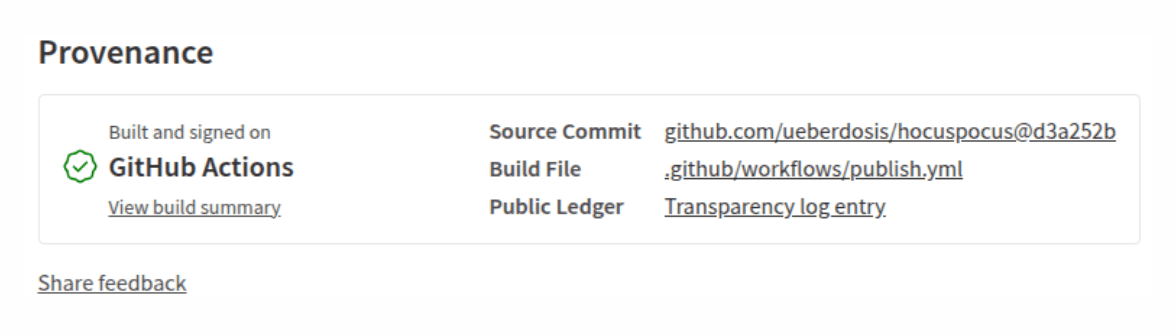
It is a verifiable record of a package's origin. It provides cryptographic proof that the package was built from a specific source repository via a trusted build platform (e.g., GitHub Actions), rather than on a developer's machine or some other unverified machine.
This makes sure the code used to make the build is not tampered with.
You can see the Provenance section in the npmjs package page.
Improving Your Project security with .npmrc
The .npmrc (NPM Running Configuration) file allows you to set default behaviors for how npm installs and manages packages.
By configuring this file at the project level, you ensure that every developer and CI/CD pipeline interacting with your repository automatically follows the exact same security rules.
Where to add the File
Create a file named exactly .npmrc in the root directory of your project (same directory as package.json).
You should commit this file to your repository so the rules apply to everyone working on the project.
Recommended Security Configurations for .npmrc
Add the following lines to your .npmrc file to enforce best practices:
1. Disable Post-Install Scripts Globally
ignore-scripts=true
Why: It prevents third-party packages from automatically executing arbitrary bash or Node scripts on your machine when you run npm install.
2. Run Audits Automatically
audit=true
Why: Ensures that npm audit runs automatically during npm install, immediately flagging known CVEs to the developer adding the package.
3. Enforce the Engine Rule
engine-strict=true
Why: npm will refuse to install any package that is incompatible with the current Node.js version, as defined in the engines field of the package.json file.
4. Include min release age
min-release-age=7
Why: Setting min-release-age creates a quarantine period. It tells npm to ignore any package version that hasn't been public for a specific number of days.
Recent npm supply chain Examples:
1. The "Mini Shai-Hulud" Worm & TanStack Hijack
Mini Shai-Hulud is a self-propagating supply chain malware worm. It targets open-source package registries (primarily npm and PyPI).
Attackers compromised the GitHub Actions CI/CD pipeline of TanStack (a highly popular suite of open-source libraries). Within minutes, the automated worm published 84 malicious artifacts across 42 @tanstack/* packages, rapidly spreading to other packages.
Impact: The worm caused a massive spike in infected software artifacts across open-source package registries, Security teams initially flagged over 300+ npm packages.
Developers use semantic versioning ranges (e.g., ^3.0.0), this leads to infected patches being pulled down automatically. This amplified the blast radius into thousands of downstream corporate applications and continuous integration (CI) workflows.
GitHub took emergency measures and destroyed 61,274 npm granular access tokens that had been stolen or scraped by the worm to stop lateral movements.
By executing directly inside trusted GitHub runner processes, the corrupted files carried genuine SLSA Build Level 3 provenance attestations. They appeared completely safe, authentic, and tamper-free to downstream enterprise firewalls
A threat actor operating under Yandex-associated aliases published 33 malicious packages spread across nine distinct organizational namespaces.
A cluster of 176 malicious npm packages was deployed using the explicit 99.99.99 versioning strategy. This caused corporate build servers to pull the malicious public packages over private internal ones.
Impact: The moment a developer or an automated CI/CD build runner executed a standard npm install, the malicious public package was downloaded and executed automatically via built-in postinstall lifecycle scripts.
To fool security teams reviewing the dependencies, the threat actors spoofed internal corporate URLs directly within the package.json file metadata.
Unlike the widespread worm, this acted as a reconnaissance tool. It collected Hostnames, local network configurations, and active directory context, environment variables, Deep cloud infrastructure secrets, including AWS IAM credentials
Attackers compromised an npm maintainer account of the widely used Axios library. They published malicious versions that secretly added a dependency (plain-crypto-js). This dependency installed a remote access trojan (RAT) capable of data theft and remote control.
Impact: Security researchers emphasized that the main goal of the RAT was credential harvesting (stealing API tokens, SSH keys, cloud access parameters, and .env files).
Cyber researchers estimate that roughly 600,000 systems ran a fresh npm install or updated their build pipelines during the specific 3-hour window (March 31, 2026, from 00:21 to 03:30 UTC) when versions 1.14.1 and 0.30.4 were live.
In today’s fast-evolving digital world, cybersecurity is no longer just an IT concern it’s a business survival strategy. From startups to global enterprises, everyone is...
Cybersecurity is no longer just a buzzword; it's a critical necessity in today's digital age, especially in countries like Saudi Arabia.
As Saudi Arabia moves towards...
In a time where technology is everywhere, the importance of cybersecurity cannot be overstated. As we inch closer to 2025, the digital landscape continues to...